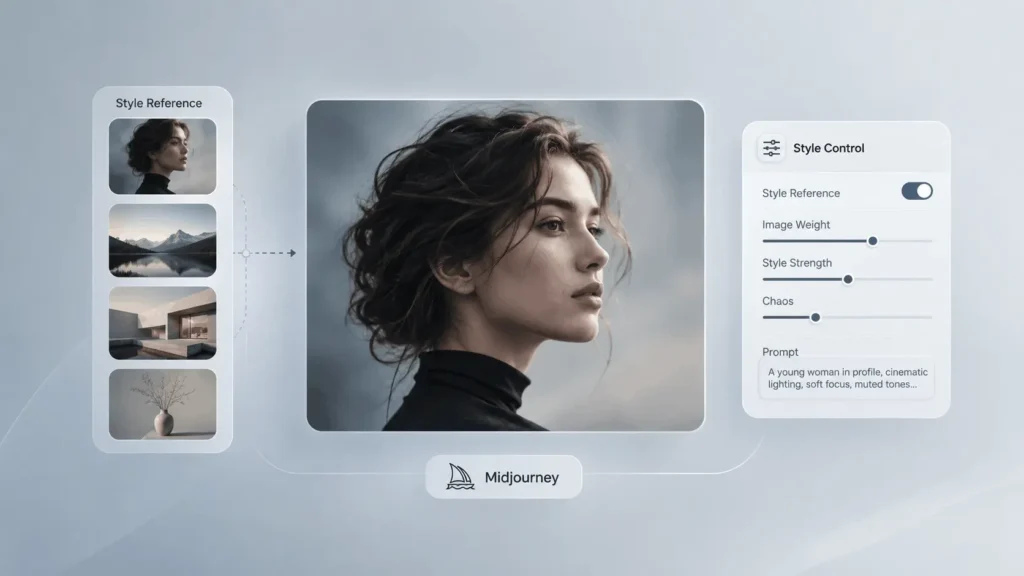
Midjourney Style Reference helps you take the visual aesthetic of an existing image and apply that look to a new generation. Instead of copying the subject, it can influence elements such as color palette, lighting, textures, medium, and overall visual mood.
For creators building consistent image series, brand visuals, concept art, editorial graphics, or cinematic scenes, --sref can be one of Midjourney’s most useful controls.
In this guide, you’ll learn How Style Reference works?, how to use --sref, how --sw affects results, How Style Reference differs from Image Prompts? and Omni Reference, and how to create reusable styles.
Quick Summary
- Midjourney Style Reference (
--sref) lets you transfer the visual aesthetic of a reference image to new generations. - It can influence colors, lighting, textures, artistic medium, and overall mood.
- Use
--sw(Style Weight) to control how strongly the reference affects the result. - Style Reference ≠ Image Prompt:
--sreffocuses on style, while Image Prompts provide broader visual guidance. - Use Omni Reference (
--oref) when you need character or object consistency. - You can combine Style Reference + Omni Reference for consistent characters with a consistent aesthetic.
- Style Reference Codes, Style Explorer, and Style Creator help you discover and build reusable visual styles.
- For better results, use strong reference images, simple prompts, and test different style-weight settings.
What is Midjourney Style Reference?
Midjourney Style Reference is a feature that lets you use an existing image to influence the visual style of a new Midjourney generation.
It can influence:
- Colors
- Lighting
- Textures
- Artistic medium
- Visual atmosphere
- Overall aesthetic
It does not primarily tell Midjourney to reproduce the people or objects in the reference image. That’s an important distinction between Style Reference and other image-reference tools.
Think of it as:
Reference Image = How it should look?
Text Prompt = What it should contain?
For example, you can use a photograph with a muted cinematic color grade as a Style Reference and prompt Midjourney to create a completely different subject while maintaining a similar visual mood.
How Does Midjourney Style Reference Work?
Style Reference separates content from aesthetic direction.
Suppose your reference image is a cinematic portrait with:
- Deep shadows
- Warm highlights
- Muted colors
- Film-like grain
- Soft directional lighting
You could then prompt:
futuristic motorcycle parked outside a modern glass building
Midjourney can use the reference’s visual characteristics while generating the motorcycle and architecture described in your text prompt.
This makes Style Reference especially useful when you want different subjects to look like they belong to the same visual universe.
How to Use Midjourney Style Reference?
Step 1: Choose a Strong Style Reference Image
Start with an image that clearly represents the aesthetic you want.
A useful reference might have:
- A distinctive color palette
- Clear lighting
- Strong composition
- Specific textures
- A recognizable artistic medium
- Consistent visual mood
Don’t choose an image simply because you like its subject.
Ask yourself:
“What exactly about this image do I want Midjourney to learn visually?”
That could be its photography style, color grading, illustration technique, lighting, or texture.
Step 2: Upload the Image to Midjourney
On Midjourney’s website, open the image menu and upload or select an image from your uploads.
You can drag the image into the Style Reference section of the Imagine bar. Midjourney also allows images to be pinned so they can be reused across multiple prompts.
The current web workflow distinguishes between:
- Image Prompt
- Style Reference
- Omni Reference
- Starting Frame
Each serves a different purpose.
Step 3: Write a Simple Text Prompt
Your text prompt should describe what you want to generate? rather than telling Midjourney how to copy the reference.
For example:
cinematic portrait of a woman standing beside a vintage car at sunset
Then add your Style Reference.
Midjourney recommends keeping prompts relatively simple when using Style References and focusing the text on the desired content.
How to Use (--sref) in Discord?
If you’re using Midjourney through Discord, add the --sref parameter followed by your image URL.
Basic structure:
your prompt --sref IMAGE_URLFor example:
cinematic portrait of a woman in a modern city --sref IMAGE_URLYou can also use multiple Style Reference images by adding multiple URLs after --sref.
What Does (--sw) Do in Midjourney?
Style Weight (--sw) controls how strongly your Style Reference influences the generated image.
The documented range is:
0–1000
The default is:
--sw 100For example:
cinematic portrait of a woman --sref IMAGE_URL --sw 100Lower Style Weight
A lower value gives the text prompt more freedom while reducing the reference’s stylistic influence.
Useful when:
- The reference is too dominant
- You want subtle color influence
- You want more creative variation
Higher Style Weight
A higher value makes the reference’s aesthetic more influential.
Useful when:
- Building a consistent visual series
- Matching a particular visual identity
- Maintaining a strong color or lighting style
However, higher isn’t automatically better. The right value depends on the reference and the result you’re trying to achieve.
What Is the Best Style Weight?
There is no single best --sw value.
A practical starting point is the default:
--sw 100Then test different levels.
For example:
| Style Weight | Typical Use |
|---|---|
| 25–50 | Subtle stylistic influence |
| 100 | Balanced starting point |
| 150–300 | Stronger visual consistency |
| 400+ | Very strong reference influence; test carefully |
| 1000 | Maximum documented setting |
These are practical testing ranges rather than official Midjourney presets.
Midjourney officially supports values from 0 to 1000, with 100 as the default.
Midjourney Style Reference vs Image Prompt
These two features are often confused.
| Feature | Style Reference | Image Prompt |
|---|---|---|
| Main purpose | Transfer visual aesthetic | Guide image content and appearance |
| Focus | Style | Content + visual guidance |
| Colors | Strong influence | Possible influence |
| Lighting | Strong influence | Possible influence |
| Objects | Not directly copied | Can influence content |
| People | Not directly copied | Can influence visual result |
| Parameter | --sref |
Image URL |
| Weight control | --sw |
--iw |
Midjourney describes Style Reference as a way to capture the look and feel of an image, while Image Prompts guide the creation using an image placed at the beginning of the prompt.
Simple rule
Use:
Style Reference → “Make it look like this.”
Use:
Image Prompt → “Use this image as visual guidance.”
Style Reference vs Omni Reference
The difference is even more important when working with characters.
Style Reference
Controls the aesthetic:
Colors + lighting + texture + medium + mood
Omni Reference
Carries a person, character, object, vehicle, or creature from a reference image into a new creation. In V7, Omni Reference uses --oref.
So a character project might use:
Character identity → --oref
Visual style → --sref
Scene → text prompt
Midjourney officially supports combining Omni Reference and Style Reference.
How to Create a Consistent Visual Style?
Style Reference becomes especially powerful when you’re producing a series.
For example, imagine you’re creating ten images for a technology publication.
Instead of manually describing:
- muted blue colors
- soft studio lighting
- subtle shadows
- editorial photography
- cool metallic textures
in every prompt, you can establish a visual reference and reuse it.
Your workflow becomes:
One Style Reference → Multiple Prompts → Consistent Aesthetic
For example:
Image 1
AI robot assistant in a modern office –sref IMAGE_URL
Image 2
futuristic data center interior –sref IMAGE_URL
Image 3
humanoid AI interface concept –sref IMAGE_URL
Image 4
technology researcher working with an AI system –sref IMAGE_URL
The subjects change, but the visual language can remain related.
How to Use Multiple Style References?
Midjourney allows multiple Style Reference images.
In Discord, you can specify multiple references with:
--sref URL1 URL2 URL3You can also assign different weights:
--sref URL1::2 URL2::1This allows one reference to have more influence than another.
For example:
Reference 1: Color palette
Reference 2: Lighting
Reference 3: Artistic medium
This can be useful when no single image represents the complete aesthetic you want.
How to Combine Style Reference With Omni Reference?
For character-driven projects, combining the two is particularly useful.
For example:
cinematic portrait of a woman walking through a rainy city
--oref CHARACTER_URL
--sref STYLE_URL
Here:
Omni Reference helps maintain the character.
Style Reference influences the visual aesthetic.
Text prompt defines the scene.
Midjourney confirms that Style References can be combined with Omni References and Image Prompts.
What Is a Style Reference Code?
You don’t always need to upload an image.
Midjourney also supports Style Reference Codes, which are numerical codes representing styles from Midjourney’s internal style system.
You can use:
--sref 123456789You can also use:
--sref randomto generate a random Style Reference Code.
Once you find a style you like, you can reuse its code across different prompts.
What Is the Midjourney Style Explorer?
The Style Explorer provides a visual way to discover Style Reference Codes.
You can browse styles, search for categories such as photographic or anime aesthetics, preview style examples, and save styles you like.
This is useful when you know the kind of visual direction you want but don’t already have a reference image.
What Is Midjourney Style Creator?
For creators who want to build their own reusable aesthetic, Midjourney’s Style Creator provides a more structured workflow.
You choose sample images that match the aesthetic you want, and Midjourney gradually refines a custom Style Reference Code.
The resulting code can then be reused with different prompts.
Midjourney says the Style Creator uses V7 for its preview images, and styles typically stabilize after several refinement rounds.
This makes Style Creator useful for developing a recognizable visual identity rather than repeatedly searching for individual reference images.
How to Create a Brand Style With Midjourney?
A brand-oriented workflow can look like this:
1. Define the visual identity
Choose:
- Color palette
- Lighting
- Texture
- Photography or illustration style
- Contrast
- Overall mood
2. Build a reference library
Collect several images that represent the desired aesthetic.
3. Test Style References
Apply them to different subjects.
4. Find the strongest reference
Choose the one that remains visually useful across different prompts.
5. Create a reusable Style Code
Use Style Creator or an existing Style Reference Code.
6. Standardize your prompts
Keep the structure consistent while changing the subject.
This creates a repeatable production system instead of relying on random generations.
How to Choose the Right Style Reference Image?
Not every beautiful image makes a good Style Reference.
Look for an image with a strong and identifiable visual language.
Good references usually have:
- Distinctive lighting
- Consistent colors
- Clear texture
- Strong artistic direction
- A recognizable medium
- A cohesive mood
Avoid references with:
- Too many competing styles
- Extremely unusual compositions
- Heavy text overlays
- Visual artifacts
- Poor image quality
- A style that only works because of its specific subject
The goal is to find an image whose aesthetic can transfer successfully to unrelated subjects.
Common Midjourney Style Reference Mistakes
1. Choosing a Reference for Its Subject
A picture of a motorcycle isn’t automatically a good motorcycle-style reference.
Focus on the aesthetic, not the object.
2. Overloading the Prompt With Style Words
If your Style Reference already establishes the aesthetic, adding dozens of style keywords can create conflicts.
Midjourney recommends keeping prompts simple and adding style words selectively.
3. Setting (--sw) Too High
Maximum style influence can make your results less predictable.
Start near the default and increase gradually.
4. Expecting the Reference Subject to Appear
Style Reference isn’t designed to copy the reference’s objects or people.
If you need a character or object from the reference, use the appropriate image-reference method.
5. Mixing Too Many References
Multiple references can be useful, but too many competing aesthetics can make the final style less predictable.
6. Ignoring Version Differences
Style Reference behavior has changed between Midjourney versions.
V7 has multiple Style Reference versions controlled with --sv, and older style codes may not behave the same way in newer versions.
What is (--sv) in Midjourney?
The --sv parameter selects the Style Reference version.
Midjourney documents six Style Reference versions for V7 when using images, with --sv 6 as the default.
For example:
cinematic portrait --sref IMAGE_URL --sv 6The different versions can interpret and apply Style References differently.
This is particularly relevant if you’re following an older tutorial or trying to reproduce an older workflow.
Best Midjourney Style Reference Workflow
For reliable results, use this workflow:
Step 1
Choose a strong aesthetic reference.
Step 2
Upload it as a Style Reference.
Step 3
Start with a simple content-focused prompt.
Step 4
Generate several results.
Step 5
Adjust --sw if the style is too weak or too strong.
Step 6
Test the reference with completely different subjects.
Step 7
If you need a reusable aesthetic, create or save a Style Reference Code.
Step 8
Use the same style reference across your project.
This approach makes it easier to identify which setting actually improves the results.
Best (--sref) Prompt Examples
Cinematic Photography
modern electric car parked outside a glass skyscraper at night
--sref IMAGE_URL --sw 150
Editorial Photography
professional portrait of a technology entrepreneur in a modern office
--sref IMAGE_URL --sw 125
Luxury Product Design
minimal luxury smartwatch on a stone surface
--sref IMAGE_URL --sw 200
Concept Art
futuristic space station orbiting a distant planet
--sref IMAGE_URL --sw 175
The important principle is to let the reference establish the aesthetic while your text prompt establishes the subject.
Can Style Reference Copy an Artist’s Exact Style?
Style Reference can influence the visual characteristics of an image, but it should not be treated as a guaranteed method for reproducing an artist’s exact work.
A better approach is to describe broader characteristics such as:
- Editorial photography
- Watercolor illustration
- Ink drawing
- Minimalist poster design
- Film photography
- Matte painting
- Vintage print texture
- High-contrast studio lighting
This also gives you more control over the final result.
Style Reference Tips for Better Results
For more predictable results:
Use one strong reference first.
Don’t begin with five different images.
Keep the prompt focused.
Describe the subject, action and environment.
Test multiple Style Weights.
Compare 50, 100, 150 and 250 rather than guessing.
Separate style from character identity.
Use Style Reference for aesthetic control and Omni Reference when character or object consistency matters.
Save successful style codes.
A good style can become a reusable asset for future projects.
Midjourney Style Reference: Best Practices at a Glance
| Goal | Recommended Approach |
|---|---|
| Transfer color palette | Style Reference |
| Transfer lighting | Style Reference |
| Transfer artistic medium | Style Reference |
| Keep same character | Omni Reference |
| Guide image content | Image Prompt |
| Build reusable style | Style Code / Style Creator |
| Adjust style strength | --sw |
| Use multiple styles | Multiple --sref references |
| Explore existing styles | Style Explorer |
| Combine character + style | --oref + --sref |
Final Verdict – Midjourney Style Reference
Midjourney Style Reference is best understood as an aesthetic control rather than a content-copying tool.
Use --sref when you want to transfer the visual language of an image, its colors, lighting, textures, medium and overall mood, into a completely different generation. Use --sw to control the strength, and use Style Reference Codes or Style Creator when you want a reusable visual identity.
For advanced workflows, combine Style Reference + Omni Reference + a focused text prompt. That gives you separate control over the style, character or object, and scene instead of asking one reference image to do everything.
Frequently Asked Questions (FAQs)
1. What is Midjourney Style Reference?
Midjourney Style Reference lets you use an existing image to influence the visual aesthetic of a new generation, including elements such as colors, textures, lighting and artistic medium. It does not primarily copy the objects or people in the reference.
2. What does (--sref) do in Midjourney?
--sref adds a Style Reference to your prompt. You can use an image URL or a Style Reference Code to influence the visual style of the generated image.
3. What does (--sw) mean in Midjourney?
--sw means Style Weight. It controls how strongly the Style Reference affects the result. Midjourney supports values from 0 to 1000, with 100 as the default.
4. Can Style Reference keep the same character?
Not by itself. Style Reference is designed primarily for aesthetic influence. For character consistency in V7, use Omni Reference (--oref) and combine it with Style Reference when you also want a consistent visual style.
5. Can I use multiple Style References?
Yes. Midjourney allows multiple Style Reference images and lets you assign different weights to individual references in Discord.
6. What is the best (--sw) value?
There is no universal best value. Start with the default 100, then increase or decrease it based on how strongly you want the reference aesthetic to influence the result.
Also Read –
Midjourney Character Consistency: A Complete Guide
How to Use Reference Photos in MidJourney: A Step-by-Step Guide (2026)