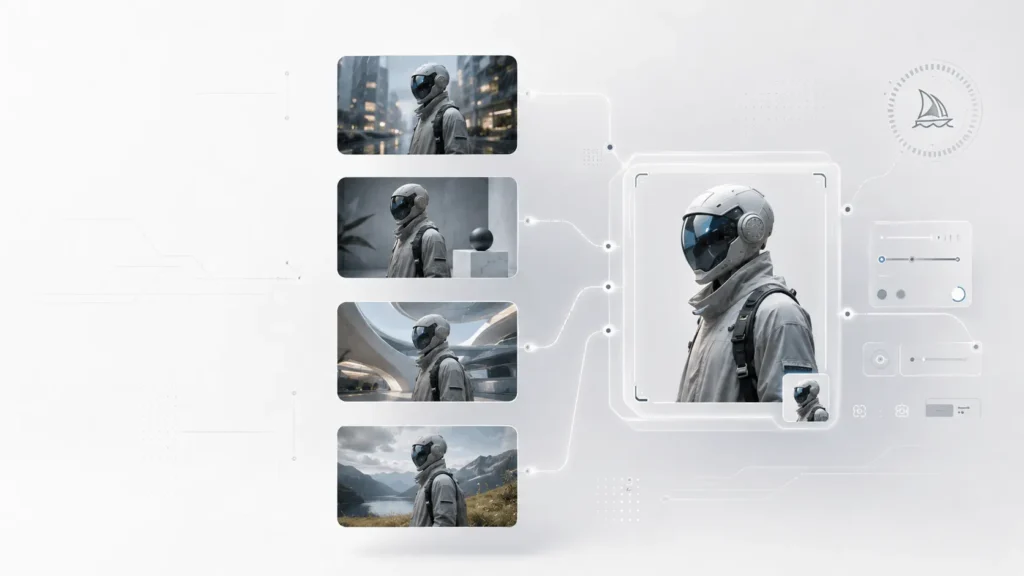
Midjourney Omni Reference lets you carry a character, object, vehicle, or creature from an existing image into a new generation. It helps maintain visual consistency across scenes for storytelling, product concepts, and creative campaigns.
Introduced with Midjourney V7, Omni Reference remains a V7 feature. With V8.2 now the default, Midjourney’s newer Edit Model supports up to four image references and is designed to replace Omni Reference workflows in V8.
Quick Summary
- Omni Reference lets you carry characters, objects, vehicles, or creatures from an existing image into new Midjourney creations.
- It helps maintain visual consistency across multiple scenes, making it useful for storytelling, products, and marketing.
- Use
--orefto add a reference image and--owto control its influence in Midjourney V7. - V8.2 is now Midjourney’s default model, with the newer Edit Model supporting up to four image references.
- For best results, treat the reference as the subject anchor and your text prompt as the scene and creative direction.
What Is Midjourney Omni Reference?
Midjourney Omni Reference is a V7 image-reference system that lets you place a character, object, vehicle, or non-human creature from a reference image into a newly generated scene. You add the reference with --oref in Discord or use the Omni Reference area on Midjourney’s website. The --ow parameter controls how strongly Midjourney follows the reference.
The important distinction is that Omni Reference is not simply asking Midjourney to copy an image.
Think of it as:
Reference image = what should appear
Text prompt = what should happen to it
For example, you might provide an image of a fictional character and prompt:
cinematic photograph of the character walking through a rainy Tokyo street at night, reflective pavement, shallow depth of field, realistic lighting
The reference supplies the character’s visual identity, while the text prompt describes the environment, composition, action, lighting, and style.
This separation is what makes Omni Reference useful beyond a single prompt.
Why Does Omni Reference Matter?
Traditional text-to-image prompting has a fundamental consistency problem.
You can describe the same person in several prompts, but Midjourney may interpret the description differently each time. Hair, clothing, facial structure, proportions, and other visual characteristics can drift.
Omni Reference gives you a stronger visual starting point.
It is especially useful when you want to:
- Keep a fictional character recognizable across multiple scenes
- Place the same product in different environments
- Create a recurring mascot
- Reuse a vehicle or prop
- Build a visual story around one character
- Create advertising concepts around an existing object
- Develop concept art with a consistent subject
- Experiment with different compositions without starting from scratch
Midjourney itself describes Omni Reference as a way to put characters, objects, vehicles, and non-human creatures into new creations.
For professional workflows, the bigger idea is controlled variation.
You are no longer trying to generate the perfect image in one prompt. You are building a reusable visual subject and changing the surrounding variables.
How Does Midjourney Omni Reference Work?
Omni Reference uses an image as a reference while the text prompt tells Midjourney what new image to create. On Midjourney’s website, you can upload or select an image and place it in the Omni Reference section of the prompt interface.
In Discord, the syntax is:
your prompt --oref IMAGE_URLYou can then control the reference strength with:
--ow 100The default Omni Reference weight is 100, and Midjourney currently allows values from 1 to 1,000. Midjourney recommends generally staying below 400 unless you are using a very high stylize value, because extremely high weights can produce unpredictable results.
Basic Example
cinematic portrait of a character standing in a futuristic subway station, dramatic overhead lighting, realistic photography --oref IMAGE_URL --ow 100The exact prompt will depend on what you want to preserve.
The important workflow is:
Choose reference → describe new scene → adjust Omni weight → generate → evaluate → refine.
That is much more reliable than continuously rewriting the entire prompt.
What Does the (--ow) Parameter Do?
The --ow parameter, or Omni Weight, determines how strongly Midjourney uses information from the reference image.
A simple way to think about it:
| Omni Weight | General Effect | Best Use |
|---|---|---|
| Low | More freedom from the reference | Loose inspiration |
| Around 100 | Balanced reference influence | General-purpose consistency |
| Higher | Stronger reference influence | Important character/object identity |
| Very high | Can become unpredictable | Experimental workflows |
These are workflow guidelines rather than guaranteed output thresholds. Midjourney officially supports values from 1 to 1,000, with 100 as the default.
Start at 100
For most projects, starting at the default is sensible.
Generate several results before changing the weight.
If the character or object is changing too much, increase the weight.
If the output feels too constrained by the reference, reduce it.
The goal isn’t maximum reference strength. The goal is the right balance between identity and creative freedom.
The Professional Trick: Separate Identity From Scene
One of the biggest mistakes beginners make is expecting the reference image to describe everything.
It shouldn’t.
Your reference image should primarily answer:
“What subject do I want to carry into this image?”
Your text prompt should answer:
“What do I want that subject to do, where should it be, and how should the scene look?”
For example, imagine your Omni Reference is a product photograph of a futuristic smartwatch.
Instead of writing:
futuristic smartwatch, black smartwatch, premium smartwatch, modern smartwatch...you can focus on the new environment:
premium technology advertisement, smartwatch resting on a sculptural stone pedestal, dark studio environment, controlled rim lighting, subtle reflections, luxury product photographyThis prevents your prompt from redundantly describing information already present in the reference.
How to Create Consistent Characters With Omni Reference?
Character consistency is one of the most popular applications.
Start with a strong reference image.
Ideally, the subject should be:
- Clearly visible
- Large enough to identify
- Free from excessive visual clutter
- Consistent in appearance
- Representative of the character you want to reuse
Then build scenes around that character.
Scene 1: Establish the Character
cinematic character portrait, standing confidently, neutral studio background, realistic photography --oref IMAGE_URL --ow 100Scene 2: Change the Environment
cinematic scene of the character walking through a rainy futuristic city at night, neon reflections on wet streets, atmospheric lighting --oref IMAGE_URL --ow 125Scene 3: Change the Action
the character riding a vintage motorcycle through a desert highway at sunset, cinematic action photography, dust in the air --oref IMAGE_URL --ow 125The character becomes the recurring visual element while the prompt controls the story.
This is far more flexible than trying to describe the character from scratch every time.
How to Use Omni Reference for Products?
Omni Reference isn’t limited to people.
It can also be used with objects and vehicles.
This opens up interesting workflows for marketers and designers.
Suppose you have an image of a sneaker.
You could create:
- A studio product advertisement
- A streetwear campaign
- A running scene
- A fashion editorial
- A minimalist e-commerce composition
- A futuristic product launch concept
For example:
premium sportswear advertisement, the sneaker placed on wet concrete after rainfall, dramatic side lighting, subtle atmospheric mist, high-end commercial photography --oref IMAGE_URL --ow 150The reference establishes the product.
The prompt establishes the campaign.
Omni Reference vs Image Prompt
These two features are easy to confuse.
An Image Prompt is primarily used to influence the content, composition, colors, or broader visual direction of a new image.
An Omni Reference is designed specifically to bring a particular character, object, vehicle, or creature into the generated result.
| Feature | Image Prompt | Omni Reference |
|---|---|---|
| Main purpose | Visual inspiration | Carry a subject into a new image |
| Character consistency | Possible, but less targeted | Core use case |
| Object consistency | Possible | Core use case |
| Composition influence | Strong | More focused on the referenced subject |
| V7 support | Yes | Yes |
| V8.2 workflow | Available | Replaced by newer Edit Model workflow |
The simplest rule is:
Use an Image Prompt when you want inspiration from an image. Use Omni Reference when you want the subject itself to appear in the new creation.
Omni Reference vs Style Reference
A Style Reference is about the look, not the subject.
Midjourney’s Style Reference system uses --sref and is designed to influence the aesthetic or visual language of an image.
For example:
- Omni Reference: “Use this character.”
- Style Reference: “Use this visual style.”
You can combine these ideas.
A useful V7 workflow can therefore look like:
character in a cinematic science-fiction scene, dramatic lighting, detailed environment --oref CHARACTER_URL --ow 125 --sref STYLE_URLThis separates three layers:
- Subject: Omni Reference
- Style: Style Reference
- Scene: Text prompt
That separation gives you considerably more control than treating the entire reference image as one instruction.
Can You Combine Omni Reference With Personalization?
Yes.
Midjourney’s documentation says Omni Reference can be combined with Personalization, Moodboards, Stylize, and Style References.
This makes it possible to build a layered workflow.
For example:
Omni Reference
Controls the character or object.
Style Reference
Controls the visual language.
Personalization
Pushes the output toward your learned preferences.
Text prompt
Controls the scene and action.
This is much closer to art direction than ordinary one-shot prompting.
How to Build a Multi-Scene Midjourney Workflow?
If you are creating a comic, campaign, storyboard, product series, or visual narrative, don’t treat every image as an isolated generation.
Create a visual system.
Step 1: Create a master reference
Choose one image that represents your character or object well.
Step 2: Keep the subject consistent
Use the same Omni Reference image when possible.
Step 3: Change one major variable at a time
For example:
- Scene
- Camera angle
- Clothing
- Lighting
- Environment
- Action
Changing everything simultaneously makes it difficult to determine why consistency was lost.
Step 4: Use a stable prompt structure
A useful template is:
[subject action], [environment], [composition], [lighting], [camera/style], [quality/detail direction] --oref IMAGE_URL --ow VALUEStep 5: Compare generations
Don’t judge a reference workflow from a single result.
Generate multiple variations and identify what remains stable and what drifts.
Step 6: Adjust the reference weight
If identity is weak, increase --ow.
If the output is too constrained, reduce it.
This iterative approach is usually more productive than constantly rewriting the entire prompt.
What Makes a Good Omni Reference Image?
The quality of the reference matters.
A good reference should make the subject easy for the model to identify.
For characters
Prefer images with:
- Clear facial visibility
- Distinctive clothing
- Reasonable lighting
- Minimal obstruction
- A recognizable silhouette
For products
Prefer:
- Clear product visibility
- Limited background clutter
- Strong separation between product and background
- A useful viewing angle
- Good resolution
For vehicles
A three-quarter view can often provide more useful visual information than an extremely cropped or partially obscured image.
The key principle is simple:
Don't use a complicated reference when a clean reference communicates the subject better.
Should You Use a Very High Omni Weight?
Usually, no.
A common beginner mistake is assuming that a higher reference weight automatically means better consistency.
It doesn’t.
Midjourney explicitly warns that very high Omni weights can produce unpredictable results, particularly above 400 in many situations.
A better approach is to increase the weight gradually.
For example:
--ow 100If the result is too different:
--ow 150Then perhaps:
--ow 200Evaluate the results rather than jumping directly to an extreme value.
Why Does Omni Reference Sometimes Change the Character?
Omni Reference is not a pixel-perfect cloning system.
Midjourney is generating a new image rather than simply cutting the original subject out and pasting it into another scene.
As a result, details can change.
You may see differences in:
- Facial details
- Hair
- Clothing
- Proportions
- Pose
- Accessories
- Lighting
- Texture
This is one reason the text prompt remains important. Midjourney’s own documentation emphasizes that the text prompt should be used together with Omni Reference to communicate the scene and additional details.
Think of Omni Reference as identity guidance, not an exact-copy command.
How Important Is the Text Prompt?
Extremely important.
A reference does not replace prompting.
Consider these two prompts using the same reference:
a person in a cityand:
cinematic street photograph of the character crossing a rain-soaked Tokyo intersection at night, low camera angle, shallow depth of field, soft reflections, realistic skin texture, atmospheric urban lightingThe second prompt provides Midjourney with significantly more information about the intended scene.
Midjourney specifically recommends combining Omni Reference with a clear text prompt.
A Better Prompting Formula for Omni Reference
For advanced workflows, think in layers.
Layer 1: Subject
What is the referenced character or object doing?
Layer 2: Environment
Where is it?
Layer 3: Composition
What should the viewer see?
Layer 4: Lighting
How is the scene illuminated?
Layer 5: Visual language
Is it editorial photography, concept art, animation, product photography, or something else?
Layer 6: Technical controls
Use aspect ratio, stylization, and other parameters only when they serve the intended result.
Example:
the character examining an ancient artifact inside a vast underground temple, wide cinematic composition, monumental stone architecture, warm torchlight mixed with cool ambient shadows, atmospheric adventure film still --ar 16:9 --oref IMAGE_URL --ow 125This is much more controllable than a prompt made almost entirely from adjectives.
Can You Use Multiple Omni Reference Images?
For V7 Omni Reference itself, Midjourney’s documentation specifies one image for the --oref parameter.
This is an important distinction because newer V8.2 workflows have changed what is possible.
Midjourney began testing its V8.2 Edit Model, which supports generating images with up to four image references at once. Midjourney describes this as replacing the Omni Reference workflow in V8.
So if you find older tutorials claiming that V7 Omni Reference can accept several Omni Reference images, check the version and workflow being discussed.
What Changed From V7 Omni Reference to V8.2?
This is currently one of the most important things to understand.
| Feature | V7 Omni Reference | V8.2 Edit Model |
|---|---|---|
| Model | V7 | V8.2 |
| Status | Available | Newer workflow |
| Reference purpose | Characters, objects, vehicles, creatures | Image-driven generation and editing |
| Reference count | 1 Omni Reference image | Up to 4 image references |
| –oref | Yes | Not the primary workflow |
| Editing/inpainting | Limited compatibility | Supported |
| Outpainting | Not directly with Omni output | Supported |
| Current default model | No | Yes, V8.2 is default |
| Best use | V7 reference workflow | New V8.2 image + editing workflow |
V8.2 became the default model on July 24, 2026, and Midjourney’s current documentation says to use the Edit Model instead of Omni Reference when working with V8.X.
The V8.2 Edit Model also supports image editing, inpainting, outpainting, and up to four image references.
That means an article about Omni Reference needs to be version-aware. A tutorial written before the V8 rollout can easily give users instructions that no longer match the current Midjourney interface.
Is Midjourney Omni Reference Still Worth Learning?
Yes, particularly if you work with V7 or need to understand existing V7 workflows.
It is also useful conceptually because it teaches an important AI image-generation principle:
Use different inputs for different jobs.
Instead of asking one prompt to control everything, separate:
- Subject identity
- Style
- Scene
- Personal aesthetic
- Composition
- Editing
That same thinking carries over into Midjourney’s newer V8.2 reference and editing workflow.
If you are starting a completely new project today, however, it makes sense to learn the V8.2 Edit Model alongside Omni Reference rather than assuming Omni Reference is the long-term default workflow. Midjourney’s documentation explicitly positions the Edit Model as the V8.X replacement.
What Are the Limitations of Omni Reference?
Omni Reference is powerful, but it has several limitations.
It is tied to V7
Omni Reference is compatible with Midjourney V7. The current documentation directs V8.X users toward the Edit Model instead.
It costs more GPU time
Midjourney says Omni Reference uses 2× the GPU time of regular V7 image generation.
It isn’t perfect identity preservation
The subject can still change between generations.
Very high weights can become unpredictable
Midjourney recommends keeping --ow below 400 in most cases unless using very high stylization.
Some V7 tools are incompatible
Omni Reference results are not currently compatible with Vary Region, Pan, or Zoom Out. Midjourney recommends opening these images in the Editor and removing the image reference and --ow parameters before editing.
It is not a pixel-perfect copy system
The feature is intended to guide generation, not reproduce an input image exactly.
7 Pro Tips for Better Omni Reference Results
1. Start with a clean reference
A clear subject generally gives you a better foundation than a cluttered image.
2. Don’t over-describe the reference
Use the prompt for the new scene instead of repeating everything visible in the reference.
3. Start around the default weight
Begin with --ow 100 and adjust based on the output.
4. Change one variable at a time
If you change the character, environment, style, lighting, camera, and composition simultaneously, troubleshooting becomes difficult.
5. Separate subject from style
Use Omni Reference for the subject and Style Reference when you want to influence the visual aesthetic.
6. Don’t depend on seeds for consistency
Midjourney itself recommends references and personalization rather than relying on seeds as the primary consistency mechanism.
7. Know when to switch to the V8.2 workflow
If you are creating new work on the current default model, learn the V8.2 Edit Model rather than forcing a V7-only workflow into V8.2. The newer model can work with up to four image references and also supports editing, inpainting, and outpainting.
Best Use Cases for Midjourney Omni Reference
Omni Reference works particularly well when the subject needs to remain recognizable while the surrounding context changes.
Content creators
Create a recurring mascot, fictional presenter, or visual character for social content.
Marketers
Generate multiple campaign concepts around the same product.
Game designers
Explore different environments and situations for a character or creature.
Concept artists
Test costumes, environments, compositions, and cinematic scenes around a consistent subject.
Storytellers
Create multiple scenes featuring the same visual character.
Product designers
Place a product concept into different advertising environments.
Brand teams
Explore campaign directions while keeping a recognizable visual asset at the center.
Midjourney Omni Reference Prompt Examples
Character Consistency
cinematic portrait of the character standing on a futuristic rooftop at sunset, distant megacity skyline, dramatic atmospheric lighting, realistic photography --oref IMAGE_URL --ow 125Product Advertisement
luxury technology advertisement, the referenced smartwatch displayed on a sculptural black stone surface, controlled studio lighting, subtle reflections, premium commercial photography --oref IMAGE_URL --ow 150Vehicle Concept
cinematic automotive photograph of the vehicle driving along a mountain road during golden hour, dramatic landscape, realistic reflections, premium advertising aesthetic --oref IMAGE_URL --ow 125Fantasy Character
epic fantasy scene of the character walking through an ancient forest covered in mist, towering trees, atmospheric volumetric light, detailed cinematic concept art --oref IMAGE_URL --ow 150These examples illustrate the core principle: the reference establishes the subject, while the text prompt builds the new context.
Conclusion – Midjourney Omni Reference A Pro Guide to (–oref)
Midjourney Omni Reference changes the way you approach image generation because it separates the subject from the scene.
Instead of repeatedly describing the same character or product, you can use a reference as a visual anchor and let your text prompt control the environment, action, composition, and aesthetic.
For V7 users, the workflow remains powerful: start with a strong reference, use --ow deliberately, and build new scenes around the same visual subject.
But Midjourney has moved beyond the original Omni Reference workflow. With V8.2 now the default model and the new Edit Model supporting up to four image references, editing, inpainting, and outpainting, the broader lesson is more important than the specific parameter: professional Midjourney workflows are increasingly about combining multiple forms of visual control rather than relying on one giant prompt.
Frequently Asked Questions (FAQs)
1. What is Midjourney Omni Reference used for?
Midjourney Omni Reference is used to carry a character, object, vehicle, or non-human creature from a reference image into a new Midjourney generation. It is particularly useful for maintaining visual consistency across different scenes.
2. Is Omni Reference available in Midjourney V8.2?
Omni Reference is a V7 feature. Midjourney’s current documentation says that when using V8.X, users should use the Edit Model instead. V8.2 is currently the default Midjourney model.
3. What does (--oref) mean in Midjourney?
--oref is the Discord parameter used to attach an image as an Omni Reference in Midjourney V7. You add the image URL after the parameter.
4. What does (--ow) mean in Midjourney?
--ow means Omni Weight. It controls how strongly Midjourney follows the Omni Reference image. The official range is 1–1,000, with 100 as the default.
5. Can Omni Reference keep the same character across multiple images?
It can help maintain the visual identity of a character across different generations, but it does not guarantee a pixel-perfect or identical recreation. Results can still vary depending on the prompt, reference, weight, and generation.
6. Is Omni Reference better than an Image Prompt?
They serve different purposes. Image Prompts provide broader visual guidance, while Omni Reference is specifically designed to bring a character, object, vehicle, or creature into a new image.
Also Read –
Ultimate Midjourney V7 Guide: Master the Next Gen of AI Art
Mastering Midjourney Style Reference: How to Control Any Aesthetic Like a Pro?
Midjourney Character Consistency: A Complete Guide
What is Midjourney Prompt Generator? A Complete Guide
Control the Canvas: A Complete Midjourney Image Editor Guide